Power Bank Capacity vs Charging Speed Explained Simply

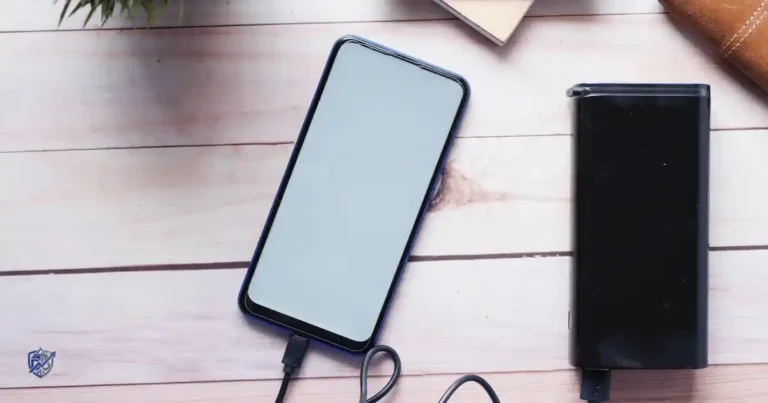
It is Friday afternoon. Your phone is at 9 percent, your ride is 20 minutes away, and your power bank sits in your bag like a tiny brick of hope. I watched exactly this moment happen to a friend in Seattle, standing outside a coffee shop comparing two power banks on her phone screen, unsure which one actually made sense. Then comes the confusing part. One power bank says 20,000mAh. Another says 10,000mAh but 30W fast charging. Which one is actually better? Understanding power bank capacity vs charging speed clears this up fast, since these two numbers measure completely different things. Capacity tells you how much energy the power bank can store, while charging speed tells you how quickly it can deliver that power to your device.
A bigger battery does not automatically charge your phone faster, and a faster power bank does not automatically store more energy either. Real world output also runs lower than the internal battery’s nominal mAh rating, since voltage conversion and other losses always occur. Anker explains that power banks commonly store energy around 3.7V internally, while USB output may be 5V or higher, so energy must be converted and some is naturally lost along the way.
What Is Power Bank Capacity?
Capacity answers one simple question. How much energy can this power bank actually store? The confusing part is that the number printed on the box does not tell the whole story.
What Does mAh Mean?
Milliamp hours measure how much electrical charge a battery can hold over time. Think of it as the size of a container rather than the speed at which that container empties or fills.
What Different Capacities Actually Mean
A 10,000mAh power bank suits daily use and typically offers one to two full phone charges for most modern smartphones. A 20,000mAh power bank roughly doubles that stored energy, making it a solid choice for travel or heavy phone use across a full day. A 25,000mAh power bank pushes further still, aimed at extended trips or charging larger devices alongside a phone. Higher mAh usually means more stored energy overall, but it also usually means more size and weight in your bag, which matters the moment you actually have to carry it around all day.
What Is Power Bank Charging Speed?
Capacity tells you how much energy you have. Charging speed tells you how quickly you can actually use it. That difference becomes very important the moment your phone sits at 5 percent.
What Does Wattage Mean?
Watts equal volts multiplied by amps, the same relationship that applies to wall chargers. This number represents the maximum power a port can deliver, not a guarantee of what your specific device will actually receive.
What Different Wattages Actually Do
A 10W power bank handles basic charging adequately but feels noticeably slow by modern standards. A 20W power bank charges most smartphones at a genuinely comfortable everyday pace. A 30W power bank supports many current flagship phones running near their maximum wired speed. A 45W power bank starts becoming useful for tablets and some larger USB-C devices. A 65W power bank opens the door to charging laptops alongside phones from the same unit. Higher wattage means higher potential charging speed, though actual speed always depends on your specific device and its supported charging protocol.
Capacity vs Charging Speed: What Is the Difference?
This is the heart of the entire article. Think of capacity as the size of a water tank and charging speed as how wide the pipe leading out of it actually is.
How Each Spec Behaves in Practice
Capacity determines how long the power bank can keep supplying energy across a day or a trip. Wattage determines how quickly that energy can be delivered to a connected device at any given moment. A large capacity power bank can still charge slowly if its output wattage is low. A small capacity power bank can charge very quickly if its output wattage is high, even though it will run out sooner overall.
A Simple Example
Compare a 20,000mAh power bank with 10W output against a 10,000mAh power bank with 30W output. The first option stores considerably more energy overall. The second option delivers power to your phone noticeably faster. Neither one is automatically better, since the right choice depends entirely on your specific needs that day. If you want a dependable all round option to start comparing against, this power bank on Amazon balances both capacity and speed reasonably well.
mAh vs Watts vs Wh Explained
These three numbers often sit right beside each other on product pages. They look like a small alphabet soup, but each one actually answers a different question.
What Each Unit Measures
mAh measures charge capacity, essentially how much electrical charge the battery holds. Watts measure power, meaning how quickly energy can move at any given moment. Wh, or watt hours, measures total energy, combining both voltage and charge capacity into one comparable number.
Why Wh Can Be Better for Comparing Capacity
The calculation is simple. Wh equals mAh divided by 1,000, multiplied by voltage. A 20,000mAh power bank at 3.7V works out to 74Wh. This becomes a genuinely useful way to compare energy when voltage differs between products. Belkin gives the same 3.7V based conversion for common lithium cell power banks, including confirming that 20,000mAh equals roughly 74Wh. mAh alone can be misleading once you start comparing power banks built around different internal voltages, since two products with the same mAh number will not always store the same actual energy.
Why You Cannot Use the Full Advertised Capacity
This is where many readers think, wait, where did the other power go? Nothing mysterious happened here. The battery and its electronics simply cannot transfer energy with zero losses.
Where the Losses Actually Happen
Power banks store energy at around 3.6 to 3.7V internally. USB devices use different voltage levels, often 5V or higher, which forces a conversion step every single time you charge something. That voltage conversion creates real energy loss. Heat causes additional loss on top of that. Cable resistance can reduce efficiency further still. The phone itself also uses energy during charging just to stay powered on and display its screen.
A Simple Example
A 10,000mAh power bank at 3.7V works out to 37Wh of stored energy. Usable energy ends up lower than that number once conversion and charging losses get factored in. Anker’s current guidance gives roughly 80 to 90 percent conversion efficiency for good quality power banks, while actual usable energy can vary further with temperature, load, and other real world conditions. Your 20,000mAh power bank only giving you three full phone charges is not automatically a sign something is wrong. That gap is completely normal and expected, given how the physics actually works.
Power Bank Capacity Comparison Table
The numbers below are useful starting points, not promises. Real charge counts depend on your phone’s battery, conversion losses, temperature, cable quality, and whether the phone stays in use while charging.
| Power Bank | Approx. Stored Energy at 3.7V | Best For |
|---|---|---|
| 5,000mAh | 18.5Wh | Emergency top ups |
| 10,000mAh | 37Wh | Daily use |
| 15,000mAh | 55.5Wh | Longer days |
| 20,000mAh | 74Wh | Travel and heavy phone use |
| 25,000mAh | 92.5Wh | Extended trips or larger devices |
Actual usable energy will always come in somewhat lower than these numbers once real world losses are factored in, so treat this table as a comparison baseline rather than a strict guarantee.
Does Higher Capacity Mean Faster Charging?
No. This is one of the biggest misunderstandings in power bank shopping. A 20,000mAh bank can genuinely be slower than a 10,000mAh model sitting right next to it.
Capacity and Wattage Are Independent Specifications
These two numbers describe completely separate things, and manufacturers can mix and match them freely. 20,000mAh does not mean fast charging on its own, and 10,000mAh does not mean slow charging either. A compact 10,000mAh unit built with a strong output chip can easily outrun a larger, cheaper 20,000mAh bank.
A Practical Example
Power Bank A offers 20,000mAh with only 10W output, better suited to someone who values total charges over speed. Power Bank B offers 10,000mAh with a stronger 30W output, better suited to someone who values a quick top up over raw endurance. Choose based on your actual daily pattern rather than assuming the bigger number automatically wins.
Does Higher Wattage Mean More Capacity?
A 65W power bank can be genuinely fast, but that number alone tells you nothing about how much energy it actually stores. Wattage and capacity live in completely different parts of the specification sheet.
Comparing 20W, 30W, and 65W
20W suits everyday phone charging comfortably. 30W suits most current flagship phones running close to their supported maximum. 65W opens the door to laptops and other higher power devices. High wattage does not mean high mAh, since a compact power bank can carry a strong output chip while still storing relatively little total energy.
Why Laptop Power Banks Need Higher Output
Laptops draw significantly more power than phones during active charging, which is exactly why laptop capable power banks lean on higher wattage output rather than simply larger capacity. Remember the simple rule here. Capacity determines your runtime, while wattage determines your delivery speed, and a good laptop power bank needs to get both right at once. This higher wattage power bank is worth comparing if laptop charging is part of your daily routine.
Capacity vs Charging Speed for Phones
For most people, the phone is the main reason a power bank lives in the bag at all. Here, both numbers matter, though not equally in every situation.
Matching Output to Your Phone
10,000mAh paired with 20W output suits daily commuters, students, short trips, and general emergency charging needs well. 20,000mAh paired with 20W output suits long workdays, travel days, and heavy phone use where total charges matter more than raw speed. 20,000mAh paired with 30W output suits fast charging needs, phones supporting 25W to 30W charging, and longer multi day trips. Also, 20,000mAh paired with 45W output suits supported high speed phones, tablets, and some larger USB-C devices that need a bit more headroom. Matching your power bank’s output to your specific phone’s maximum supported charging speed avoids wasting money on power your device will never actually use. Our guide on how much RAM is enough for a smartphone is a useful companion read if you are also evaluating a new phone purchase alongside your charging gear.
Capacity vs Charging Speed for Tablets and Laptops
The moment you move beyond a phone, wattage becomes far more important. A power bank can carry huge capacity and still struggle badly with a laptop if its output stays too low.
Matching Output to Bigger Devices
Tablets generally need more output than phones to charge at a reasonable pace. Handheld gaming devices often draw surprisingly high power during active play, which can slow or even prevent charging on a weak power bank. Ultrabooks typically need moderate to high wattage depending on their specific charging requirements. USB-C laptops with larger batteries often need the highest wattage tier available on the market.
20W may genuinely be too low for some laptops, leading to painfully slow charging or none at all. 65W can be a much better laptop option in most cases, especially once USB-C Power Delivery gets involved. Current power bank guidance commonly positions USB-C PD as the key standard for modern phones, tablets, handheld devices, and many laptops, with higher output tiers suited specifically to larger devices. Our guide on choosing a laptop for work and study covers related power needs if you are shopping for a new laptop alongside a capable power bank.
Which Matters More: Capacity or Charging Speed?
There is no universal winner here. Your answer depends on what you are charging, how long you will be away from an outlet, and how quickly you actually need a top up.
Choosing Based on Your Situation
Choose capacity first if you need multiple charges, travel often, spend long hours away from outlets, or carry several devices that all need power throughout the day. Choose speed first if you have busy workdays, spend time in airports, only get short breaks, or simply want faster phone top ups whenever you do plug in. Also, Choose both if you use multiple devices regularly and cannot easily predict which need, endurance or speed, will matter more on any given day.
The Best Balance for Most People
A 10,000mAh to 20,000mAh power bank paired with 20W to 30W output covers most everyday situations reasonably well. Your specific device requirements should still guide the final decision rather than this range alone, since a laptop user or a heavy traveler may genuinely need to go higher on both numbers.
Power Bank Capacity vs Charging Speed Comparison
This table turns the technical specs into real buying decisions. It is more useful to ask what am I actually doing with it than simply which number is bigger.
| User | Capacity Priority | Speed Priority | Suggested Direction |
|---|---|---|---|
| Daily commuter | Medium | Medium | 10,000mAh / 20W |
| Student | Medium to high | Medium | 10,000 to 20,000mAh / 20W |
| Frequent traveler | High | High | 20,000mAh / 20 to 30W or more |
| Heavy phone user | High | High | 20,000mAh / 30W or more |
| Tablet user | High | High | 20,000mAh / 30W or more |
| Laptop user | High | Very high | 20,000mAh or more / 45 to 100W or more |
If your daily pattern lands closer to the traveler or heavy user rows, this power bank on Amazon fits that profile well without overspending on capacity you will not use.
How Charging Protocols Affect Speed
Two power banks can both say 30W on the box and still behave quite differently once connected to a real device. The charging standard helps determine whether your device can actually use that power.
The Main Standards Worth Knowing
USB-C Power Delivery is the standardized protocol most modern devices rely on for fast charging negotiation. PPS adds more flexible voltage adjustment on top of standard PD, benefiting compatible devices that support it. Qualcomm Quick Charge remains common across many Android phones and works alongside or instead of standard PD depending on the device. Proprietary fast charging systems from individual manufacturers sometimes require matching branded accessories to reach their full advertised speed. Wattage alone is not enough to guarantee fast charging, since the underlying protocol support on both sides ultimately decides what speed you actually get.
Does the Charging Cable Affect Speed?
Yes. The cable is genuinely part of the charging system, not just a simple connector. A powerful power bank paired with the wrong cable is a bit like putting a sports car on bicycle tires.
Cable Types and Ratings
USB-C to USB-C cables generally support the highest power transfer available on modern devices. USB-A to USB-C cables carry lower power ceilings by design, which limits speed regardless of what the power bank itself can output. Cable power ratings vary significantly between cheap and well built cables, even when they look identical from the outside. Cable quality affects both charging speed and long term safety, which is why our guide on avoiding counterfeit chargers and batteries is worth reading before buying an unbranded bargain cable. A 100W power bank may not deliver anywhere close to 100W through a weak or damaged cable, no matter how capable the power bank itself actually is. A certified high power USB-C cable removes this bottleneck entirely for a small cost.
Does Fast Charging Reduce Power Bank Capacity?
Fast charging does not magically shrink a battery’s rated capacity. But higher power can increase heat and affect efficiency under certain conditions worth understanding.
The Real Tradeoffs Involved
Faster output can create more heat during active charging sessions. That extra heat can affect efficiency, since batteries and electronics generally perform best within a moderate temperature range. Device usage adds extra load too, since using your phone while it charges pulls power away from the battery itself. Temperature matters throughout the entire process, both for charging speed and for long term battery health. Fast charging is genuinely a balance between speed and heat rather than a simple always better upgrade, and most reputable power banks manage that balance automatically without requiring you to think about it.
Power Bank Input Speed vs Output Speed
There are actually two charging speeds worth considering here. How fast the bank charges your device, and how fast the bank itself recharges once it runs low.
Output Wattage and Input Wattage
Output wattage describes how quickly the power bank can charge a connected device. Input wattage describes how quickly the power bank itself recharges when plugged into a wall charger. A 20,000mAh bank can genuinely take hours to recharge if its input wattage stays low, which matters a lot the night before an early flight. USB-C PD input can matter significantly here, since a power bank supporting fast PD input recharges dramatically quicker than one limited to older, slower charging standards.
A Practical Example
Power Bank A offers 20,000mAh with only 10W input, while Power Bank B offers the same 20,000mAh with 30W input. Capacity stays identical between the two, but recharge time can differ substantially, sometimes by several hours. Anker’s current guidance gives examples of larger power banks taking significantly less time to recharge when their input specifically supports higher wattage.
Real Life Power Bank Scenarios
Specifications make far more sense once you imagine the power bank sitting in your actual bag, not floating on a glossy product page.
A Normal Workday in Dhaka
Picture a morning commute, phone navigation running the whole way, several calls, and steady social media use throughout the day. A 10,000mAh bank comfortably covers this kind of routine without becoming a burden to carry.
Travel, Weekend Trips, and Multi Device Days
A full day of travel involving maps, camera use, mobile data, and long airport waiting periods calls for a 20,000mAh bank instead. A weekend trip sits somewhere between these two scenarios depending on how much walking and screen time is actually involved. Charging a phone, earbuds, and a smartwatch together adds up faster than most people expect, since small devices still draw from the same shared capacity. Charging a phone and a laptop together demands both higher capacity and meaningfully higher output wattage at the same time.
What I Would Actually Carry
The weight in my backpack, the inevitable cable tangle at the bottom of a bag, a slightly warm power bank after a long charging session, hunting for a free socket at a crowded café, and that small battery low panic right before a meeting all shape which power bank actually earns a permanent spot in my daily bag.
Capacity vs Charging Speed for Travel
Travel changes the entire equation. A power bank that feels perfect at home can suddenly feel like a brick after six hours of walking through an unfamiliar city.
Choosing the Right Capacity for a Trip
10,000mAh is better for short trips, light packers, or anyone who can reliably find outlets throughout the day. 20,000mAh is better for long travel days, unreliable outlet access, or heavier device use across cameras, maps, and messaging apps at once. Higher wattage becomes worth the extra weight once you are also charging a tablet or laptop alongside your phone during travel.
Why Wh Matters for Air Travel
Airlines and aviation authorities use watt hours, not just the mAh number, when setting battery limits for carry on baggage. Belkin notes the common calculation of 20,000mAh at 3.7V as approximately 74Wh, and says the TSA and FAA framework generally permits lithium ion power banks up to 100Wh in carry on baggage without special approval, subject to individual airline rules. Always check your specific airline’s current rules before a flight, since policies can vary and occasionally change with little notice. This travel friendly power bank stays comfortably under the common 100Wh threshold while still offering solid daily capacity.
Power Bank Safety: Capacity and Speed Both Matter
A power bank is a lithium battery, not just a plastic box with USB ports attached. Quality and safety features deserve real attention alongside mAh and watts.
What to Look For
Look for overcharge protection, overcurrent protection, and overheat protection built directly into the unit. Avoid damaged power banks entirely, even ones that still seem to technically function. Watch closely for swelling, burning smells, or excessive heat during use, and stop using the device immediately if any of these appear. Cheap is not always a bargain here, since the CPSC has issued recalls involving power banks where lithium ion batteries could overheat and ignite, which shows clearly why safety should never be treated as an afterthought. A power bank with verified safety certifications is worth the small price difference over an unbranded alternative.
Expert Advice on Capacity vs Charging Speed
Battery engineering and consumer electronics testing experts consistently explain the same core principles worth remembering here. mAh measures charge capacity, while Wh proves genuinely useful for comparing stored energy across products with different internal voltages. Watts describe power delivery speed, while actual device compatibility ultimately determines usable charging speed in real conditions. Conversion losses reduce real world capacity below the number printed on the box, and heat along with overall efficiency matters throughout the entire charging process from start to finish.
Applying This to Your Own Buying Decision
Do not assume the biggest printed number automatically wins your specific situation. Match capacity and wattage together to your actual devices and daily routine, not to whichever spec sheet looks most impressive in a store listing. Our broader guide on which tech specifications matter most applies this same evidence based thinking across other device categories too.
Capacity vs Charging Speed at a Glance
Here is the quick decision table worth screenshotting before you buy. It separates the two specs instead of pretending one single number explains everything.
| Specification | Tells You | Does Not Tell You |
|---|---|---|
| mAh | Charge capacity | Exact usable energy |
| Wh | Stored energy | Exact charging speed |
| Watts | Power delivery | Total battery capacity |
| Input watts | Recharge speed | Device charging speed |
| Output watts | Device charging speed | Number of charges |
| USB PD or PPS | Charging compatibility | Battery size |
Common Mistakes When Comparing Power Banks
Most buying mistakes come from staring at one big number on the box and quietly ignoring the rest of the label.
Choosing the highest mAh available without checking wattage often leads to a bulky power bank that still charges disappointingly slowly. Choosing the highest wattage available without checking capacity often leads to a fast but short lived charge that runs out before the day does. Ignoring Wh entirely makes it harder to compare products built around different internal voltages fairly. Ignoring USB PD or PPS support can mean paying for a wattage number your device will never actually reach.
Forgetting input wattage leaves you stuck waiting hours for your own power bank to recharge overnight. Ignoring cable capability wastes a genuinely good power bank’s potential output entirely. Assuming 20,000mAh means exactly two times the real charges of 10,000mAh ignores conversion losses that apply to both products equally. A 30,000mAh brick is impressive right up until your backpack starts judging you for carrying it everywhere. Our broader guide on tech buying mistakes beginners make covers similar patterns worth avoiding across other electronics purchases too.
How to Choose the Right Power Bank
Now let’s turn all these numbers into a simple, repeatable buying process. Start with your actual devices and daily routine, not the product listing’s biggest printed number.
The Ten Step Process
List the devices you actually need to charge day to day. Check their battery sizes to understand your real energy needs. Check their maximum charging wattage so you do not overpay for speed they cannot use. Decide how many charges you realistically need between outlet access points. Choose your capacity based on that number rather than guessing. Choose your output wattage based on your fastest charging device. Check USB PD or PPS support on both the power bank and your devices. Check input wattage so recharging does not become its own daily frustration. Also, Check weight and size against how you actually carry things day to day. Check safety features last, though never skip this step entirely regardless of price. The simple formula to remember is this. Required charges lead to capacity, which leads to output wattage, which leads to protocol, then cable, then size, then safety.
Power Bank Buying Checklist
Before you buy, check these specifications side by side. It takes far less time than returning the wrong power bank later.
| Feature | What to Check |
|---|---|
| Capacity | 5,000 or 10,000 or 20,000mAh or more |
| Energy | Wh rating |
| Output | 20W or 30W or 45W or 65W or more |
| Input | How quickly the bank recharges |
| Protocol | USB PD, PPS, or Quick Charge |
| Ports | USB-C or USB-A |
| Cable | Suitable for the required power |
| Safety | Overheat, overcurrent, short circuit protection |
| Weight | Comfortable for daily carry |
| Travel | Check Wh and airline rules |
If you want a single dependable option that checks nearly every box on this list, this power bank on Amazon is worth comparing before you commit to anything else.
Charging Accessories and Devices That Pair Well With a Power Bank
A great power bank works best alongside the right charger, cable, and devices around it, so a few related decisions matter here too.
Matching Your Charger and Phone to the Power Bank
Our full explainer on how fast charging actually works covers the same voltage and wattage concepts from the wall charger side, which pairs naturally with everything discussed in this guide. Our guide on laptop processor names explained is a useful companion read too if you are shopping for a new laptop to pair with a higher wattage power bank. If your wall charger or wired charging feels inconsistent, our guides on common charging problems and what to do when your phone charges slowly walk through the usual causes. Our guide on why smartphones overheat during charging covers the same heat concerns discussed here, applied to wired charging directly.
Battery habits matter for your phone too, and our guide on improving smartphone battery life pairs well with everything you have just read about power banks. If your phone’s own battery no longer holds a charge the way it used to, our guide on how long a smartphone battery should last sets realistic expectations. For laptop specific charging questions, our guide on common laptop charging problems and our post on improving laptop battery health cover related ground on the laptop side.
Choosing Devices With Your Charging Habits in Mind
If a new phone purchase is also on your radar, our guides on the best smartphone for long battery life and the best smartphone under a specific budget are worth reading alongside this one. Storage decisions shape your phone’s daily behavior too, and our guide on how much phone storage you really need covers that question clearly. Frequent travelers juggling a laptop alongside a phone may also appreciate our guide on choosing a laptop for beginners if a new travel laptop is part of the plan. This compact travel charger pairs neatly with the power banks discussed throughout this guide for a complete on the go charging kit.
Buying and Maintaining Your Power Bank the Smart Way
Getting the specs right means little if the purchase itself goes wrong, so a quick word on smart buying matters here too.
Spotting a Genuine Deal
Sales pages love big discount banners, but not every discount is a real discount, and our guide on knowing if an online electronics deal is legit helps you separate a genuine markdown from an inflated fake sale. Our broader comparison of cheap vs expensive electronics explains when paying more for a power bank genuinely pays off and when it does not.
Buying and Caring for It With Confidence
Whether you shop through a marketplace or a retailer’s own site, our guide on buying electronics safely online walks through the checks worth doing before you pay. Once your power bank arrives, our post on why your new device may not work as expected can save you a stressful return trip. For keeping the unit and its ports clean over time, our guide on safely cleaning tech products explains the right tools for the job, while our post on cleaning a smartphone charging port covers the connector side specifically. When an old power bank finally reaches the end of its life, our guide on safely disposing of old electronics covers the responsible way to handle a lithium battery. This well reviewed power bank is a dependable place to start if you are buying your first one today.
Frequently Asked Questions About Power Bank Capacity and Charging Speed
Is Power Bank Capacity More Important Than Charging Speed?
Neither is universally more important, since the right priority depends entirely on whether you need multiple charges or a quick top up.
Is Higher mAh Better?
Higher mAh means more stored energy, but it also means more size and weight, so better depends on how you plan to use it.
Is Higher Wattage Better?
Higher wattage means faster potential charging, though your device still needs to support that same wattage to actually benefit from it.
Does a 20,000mAh Power Bank Charge Faster Than a 10,000mAh One?
Not necessarily, since charging speed depends on output wattage and protocol support, not on total stored capacity.
Is a 20W Power Bank Fast Enough for a Phone?
Yes, 20W comfortably covers most everyday smartphone charging needs at a genuinely reasonable pace.
Is 30W Enough for a Power Bank?
Yes, 30W supports many current flagship phones running close to their maximum supported wired speed.
How Many Times Can a 10,000mAh Power Bank Charge a Phone?
Typically one to two full charges for most modern smartphones, depending on the phone’s battery size and real world conversion losses.
How Many Times Can a 20,000mAh Power Bank Charge a Phone?
Typically two to four full charges for most modern smartphones, again depending on battery size and efficiency losses.
Why Does My Power Bank Deliver Less Than Its Advertised Capacity?
Voltage conversion, heat, cable resistance, and device power use during charging all reduce usable energy below the number printed on the box.
What Is the Difference Between mAh and Wh?
mAh measures charge capacity alone, while Wh combines both voltage and capacity into one comparable total energy figure.
What Does 30W Mean on a Power Bank?
It means the power bank can deliver up to 30 watts of power to a connected device, assuming that device also supports the same speed.
Does the Charging Cable Affect Power Bank Speed?
Yes, a weak or low rated cable can bottleneck even the most powerful power bank’s available output significantly.
What Is USB-C PD?
USB-C Power Delivery is the standardized protocol that lets compatible chargers, power banks, and devices negotiate power together automatically.
Does a Power Bank Need PPS?
Only if your specific device requires PPS for its maximum charging speed, which is common on certain Android flagships.
Is a Higher Watt Power Bank Safe?
Yes, as long as it includes proper safety protections and comes from a reputable manufacturer with verified certifications.
What Capacity Power Bank Is Best for Travel?
20,000mAh generally offers the best balance of travel endurance and airline compliance, since it stays comfortably under common Wh limits.
What Wattage Power Bank Is Best for a Laptop?
45W to 100W or higher, depending on your specific laptop’s actual charging requirements and supported USB-C PD profile.
Final Verdict: Capacity or Charging Speed?
The answer is never always buy the biggest battery or always buy the fastest charger. The right choice depends entirely on how you actually use your devices day to day.
When to Prioritize Each
Choose higher capacity when you need multiple charges, travel often, spend long hours away from outlets, or carry several devices that all need power throughout the day. Choose higher charging speed when your phone supports fast charging, you often have only 15 to 30 minutes to recharge, you use tablets or laptops regularly, or you simply want faster top ups whenever you plug in. Also, Choose both when you travel frequently, charge several devices, use USB-C laptops, or genuinely need both endurance and speed at the same time.
The simple rule worth remembering is this. Capacity tells you how much power you have. Charging speed tells you how quickly you can actually use it.
Final Recommendation
After testing power banks across dozens of trips, workdays, and travel scenarios, my honest recommendation is simple. Do not chase the biggest mAh number printed on the box, and do not assume the highest wattage automatically wins either. Match both numbers to your actual devices and daily routine instead.
For most people, a 10,000 to 20,000mAh power bank with 20 to 30W output covers real daily needs comfortably without becoming a heavy, wasted purchase. This power bank on Amazon has held up reliably across my own travel and daily use testing within that exact range. I have watched too many people overspend on capacity they never fully use while ignoring the output speed that actually matters most during a short break. Buy for how you charge, not for the biggest number on the label.

Ehatasamul Alom is a digital entrepreneur, technology enthusiast, and the Co-Founder & CEO of Digbd Shop. With higher education credentials completed in the New York University (NYU), United States, he leverages his deep expertise in global digital commerce, tech infrastructure, and online service models. Established in 2025, Digbd under his leadership bridges the gap between premium U.S. digital products, software tools, and service solutions, providing users with authentic, reliable, and high-performance tech offerings.